- If your drive is making strange noises or reports a CRC read IO error, DO NOT PROCEED.
- This indicates a hardware failure so your data is not going to be recoverable using "undelete" style data recovery software.
- As soon as you realize your data has been deleted, stop using the computer! The less activity the better to avoid dangerous disk-swap activity.
- Find and download data recovery software on another computer.
- Save the recovery tool to a flash drive and run it directly from there.
- Save the extracted data back onto the flash drive for added safety.
Free Advice on Dealing with "Dead" Hard Drive
Your Hard Disk seems dead. It's not responding anymore. You hear a few "biz biz" when you're trying to boot from it and then it stops and you can't access it.
You try everything, and I mean everything because I know you... You even knock it, you even rock it because you remember having read that it might help. And that's true, the damned thing is just stucked in there. You well may succeed, but maybe not. You lost everything, and a hard disk.
Stop crying. The thing is dead, so why don't you open it ? You have nothing to loose. Get a screwdriver and have a peek inside. Don't touch the plates, don't touch anything. Plug it. Try to boot, from it or from another one or from a floppy, doesn't matter.
Observe. As you start up, the arm moves a bit (biz biz) but then it stops. Push on it a bit. The head will now go all the way to the inner part of the plates. That's the " biz biz biz biz biz biz biz biz biz biz biz " you're familiar with. If not, cut the power off and put it back on ; try something, you'll get lucky.
Save your data on another disk.
At the next restart, maybe you'll have to help it again, maybe not. It depends on how lucky you are.
Source : http://bernardbelanger.com/computing/hd/index.html
Tag: fat, ntfs, Windows XP
New CD Repair Tool Freeware
Recovery Toolbox for CD Free (download) has been developed for recovering data from corrupted media of all kinds are most common today: CD, DVD, HD-DVD, Blu-Ray, etc. This program allows you to recover files of any type. Tool completely scan the disk and store as much information as possible. During the recovery process, Recovery Toolbox for CD Free uses a lot of different algorithms, which greatly increase the number and quality of recovered data.
Users will get a full report and read about all the details of the recovery process.
This program allows users to control the recovery process in the most comfortable way: what files and from which to recover, where to store the data and so on. It is also possible to view all the necessary information both about the source of the recovered data and about their location will be saved to the destination.
Download : http://www.recoverytoolbox.com/download/RecoveryToolboxForCDInstall.exe
Tag: fat, free, ntfs, Windows Server, Windows Vista, Windows XP
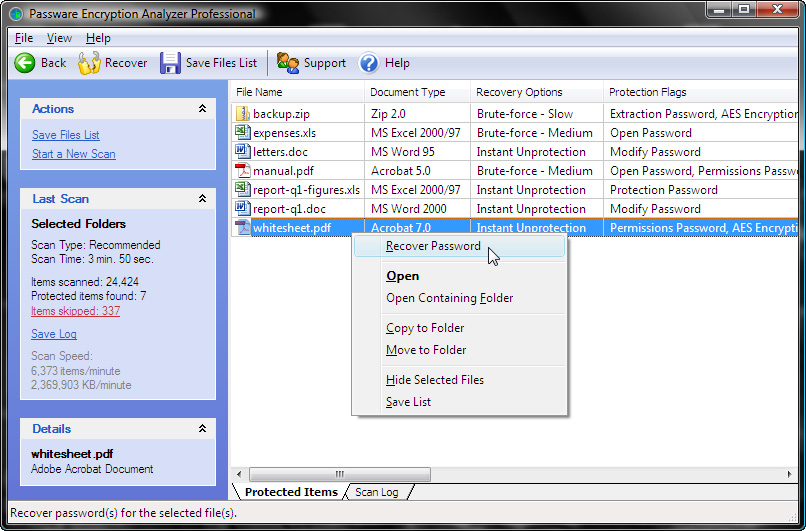
Encryption Analyzer Free
Find all password-protected or encrypted files on your PC or via network.
Main Features
* Scans files fast - more than 4,000 files per minute on the average PC
* Supports more than 100 different file formats
* List the recovery options and launches appropriate password recovery modules if necessary
* Provide detailed information: the file format, method of protection
* User-friendly Explorer-like interface
* Available as an SDK for. NET
* This free version is available
Benefits
* For Home Users
You get a free check of how secure your files. With EA you can also verify that you still have the password for your important files. If you need protection you file, you do not need to seek
for the appropriate product - EA do it for you and perform the necessary module password recovery. Enjoy the easy to use explorer-like interface with all the necessary options at hand.
Dowmload : http://www.lostpassword.com/f/downloads/ea/ea-free.msi
Tag: fat, free, ntfs, Windows Server, Windows Vista, Windows XP
EASEUS Todo Backup 1.0
EASEUS todo is an award-winning backup and Free backup and restore solution for good reason: with detailed instructions on the wizard, your computer will be in a safe condition in a few minutes without the help of IT specialists for your system state backup, and disk partitions. And this program is completely free to use!
EASEUS Todo backup can backup your system partition to quickly get the system and running in terms of system crash or hardware failure. This allows you to backup and restore disk or partition after a virus attack, unstable software downloads, hard drive failure, etc. Meanwhile, the Reserve Todo EASEUS useful if you want to upgrade the hard disk is smaller older without reinstalling the system operations and the application again.
If your system crashed or Linux-based bootable CD to restore the system fails, we recommend you to restore a system based WinPE bootable CD that is more powerful than the Linux one: run without installation, support Windows 7 and Hardware Raid, etc.
This free backup software supports almost all major Windows systems, like Windows 2000 Professional / XP / Vista and Windows Server 2000/2003/2008.
Download : http://www.todo-backup.com/download/
Tag: fat, free, ntfs, Windows Server, Windows Vista, Windows XP
Easeus
One nice touch, especially with Easeus is a preview of the recovery that allows you to visually scan through all the deleted files and select what you want to recover. Smooth GUI make this process painless. Since working with mountable drive, you can recover your lost cell phone pictures, the iPod files or digital camera shots.
Download : http://www.easeus-deletedrecovery.com/download.html
Tag: fat, free, ntfs, Windows Server, Windows Vista, Windows XP