
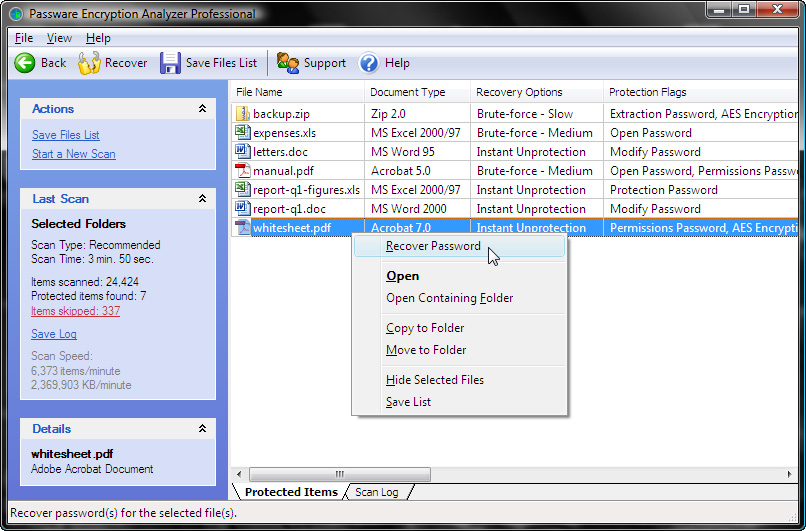
Find all password-protected or encrypted files on your PC or via network.
 Main Features
* Scans files fast - more than 4,000 files per minute on the average PC
* Supports more than 100 different file formats
* List the recovery options and launches appropriate password recovery modules if necessary
* Provide detailed information: the file format, method of protection
* User-friendly Explorer-like interface
* Available as an SDK for. NET
* This free version is available
Benefits
* For Home Users
You get a free check of how secure your files. With EA you can also verify that you still have the password for your important files. If you need protection you file, you do not need to seek
for the appropriate product - EA do it for you and perform the necessary module password recovery. Enjoy the easy to use explorer-like interface with all the necessary options at hand.
Dowmload : http://www.lostpassword.com/f/downloads/ea/ea-free.msi
Some helpful tips for
using freeware data recovery software
- If your drive is making strange noises or reports a CRC read IO error, DO NOT PROCEED.
- This indicates a hardware failure so your data is not going to be recoverable using "undelete" style data recovery software.
- As soon as you realize your data has been deleted, stop using the computer! The less activity the better to avoid dangerous disk-swap activity.
- Find and download data recovery software on another computer.
- Save the recovery tool to a flash drive and run it directly from there.
- Save the extracted data back onto the flash drive for added safety.
Try My Best Stuff (Most People Looking)
Encryption Analyzer Free
Tag: fat, free, ntfs, Windows Server, Windows Vista, Windows XP
Subscribe to:
Post Comments (Atom)


 Posts
Posts


0 Mesage:
Post a Comment